> For the complete documentation index, see [llms.txt](https://docs.adalysis.com/llms.txt). Markdown versions of documentation pages are available by appending `.md` to page URLs; this page is available as [Markdown](https://docs.adalysis.com/product/product-updates/q1-2026.md).
# Q1 2026
Product updates in January – March 2026
## Mar 24
### View performance data for RSA & PMax assets
The performance metrics for individual RSA & PMax assets are now available within Adalysis. Use this data to analyze how well each asset performs, and replace it when appropriate.
#### **RSA asset performance**
The **RSA manager** now shows performance data for various date ranges.
To view the assets in a specific campaign or ad group, use the filter at the top of the screen.
The **RSA asset insights** tool shows a visual summary of your assets' pinning, ad strength, and count:
#### **PMax asset performance**
The new **Manage** > **PMax** > **Assets** screen shows performance data for various date ranges:
We'll soon add the ability to define filters and alerts based on the RSA & PMax asset performance, as well as full editing of the text assets and A/B testing.
If you have any feedback, we'd love to hear from you ().
## Mar 13
### Performance goal pacing and alerts
We've added the ability to set performance goals and view their pacing. An example of a performance goal could be to achieve X conversions this month for the whole account (or a group of campaigns). Goals can also be set for custom date ranges.
You'll find this new feature as shown below:
You can also choose to get alerts in the case of overpacing or underpacing. Alerts will be displayed on the screen and, optionally, sent via email.
## Mar 9
### Introducing the Task Assistant
We’re introducing the **Task assistant** to help you focus on what matters most and get more from Adalysis. It guides you through the key tasks to complete in Adalysis each day.
Think of the **Task assistant** as your **to do** **list**. You'll see this new tool here:
Once opened, you'll see two groups of tasks:
#### **'Your task list' section**
This section lists pending tasks in your accounts and is **customized** based on your own data. Click the *Guide me* option for a tutorial and dismiss the task once done (or skipped).
Your task list is **refreshed every day** to provide you with an updated to do list. It's also a great way for team leaders to review progress.
#### 'Scheduled optimization tasks' section
This section shows **routine optimization tasks** you might want to perform in your accounts. You can schedule the tasks and receive reminders when they're due.
The counter indicates how many tasks are due today.
Adalysis supports many more optimization tasks, and we’ll continue expanding this list with new tasks and tutorials.
The counters will indicate if you have any tasks that are due today:
Looking forward to hearing any feedback you might have. We can be reached at .
## Feb 15
### Notifications for critical alerts are now enabled by default
Adalysis triggers critical alerts for issues stopping your ads from running. The alerts always show in your Adalysis account, and an optional notification setting lets you receive an email/Slack alert as well. This can help you act more quickly.
This notification is now enabled by default in all accounts. To change that setting, please go to the **Notifications** section:
### More performance monitors in the template
When creating a performance monitor to track your KPIs, you now have more ready-to-use examples in the template:
### Comparison data for PMax search term overlap
The PMax search term overlap view is a favorite among Adalysis users. It now includes performance comparisons for overlapping search terms in PMax and Search or Shopping.
See which campaign type is driving stronger results and add the right negative keywords directly in Adalysis.
### Search term n-grams now support up to five words (up from three)
For easier keyword mining, search term n-grams are now generated for up to five words. The analysis runs automatically every week and can be found as shown below:
### Create budget groups by label or campaign type
Pacing budget groups now support groups of campaigns based on their common label or type.
When you create a budget group based on a label, any new campaigns added to that label automatically join the budget group.
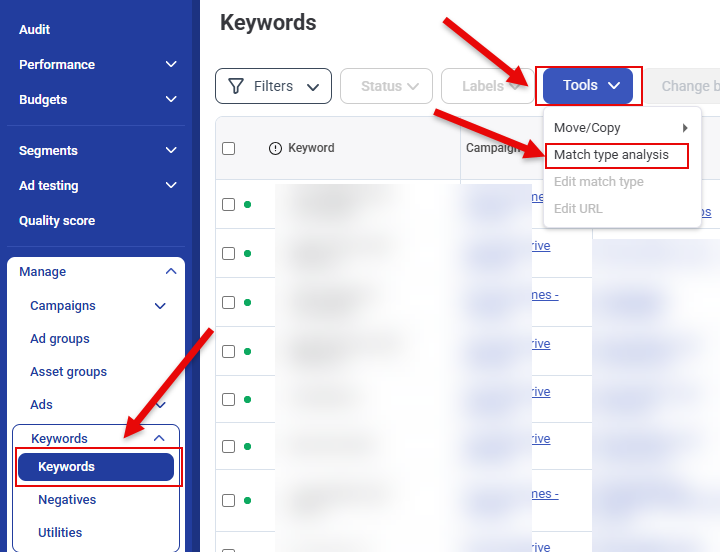
### Keyword match type analysis enhancement
The keyword match analysis tool now supports multiple date ranges for a more thorough analysis:
## Jan 25
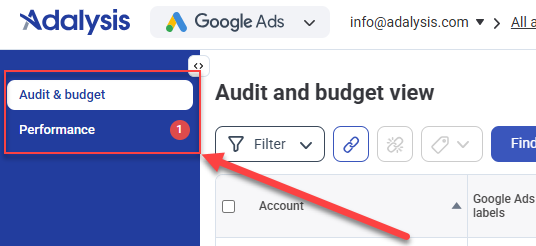
### New consolidated navigation
The navigation in the *Home* screen now consists of only two options.
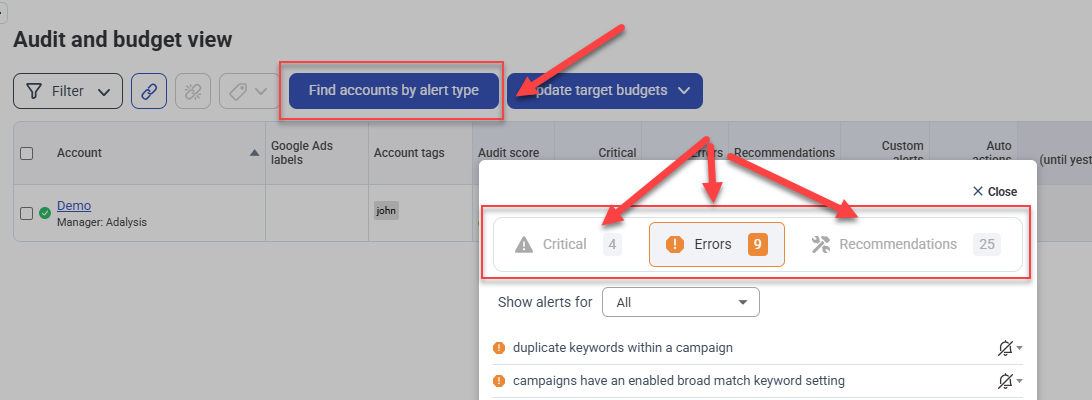
The **Audit & budget** screen displays the results of the automated audit as well as all the budget data. By default, no performance data is shown on this screen, although the option to add it is still available.
The **Find accounts by alert type** filter on this screen was also redesigned to provide a better experience finding the relevant accounts quickly.
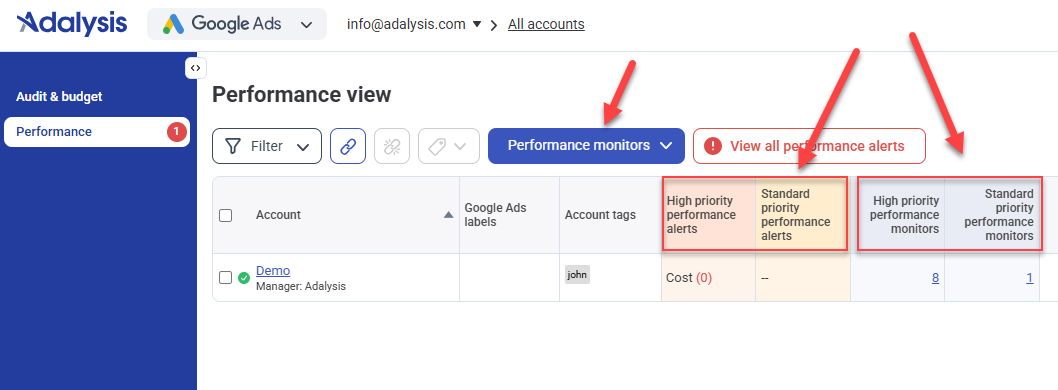
The **Performance** screen displays the performance alerts and monitors, as well as the standard performance data. The ability to manage monitors, including global monitors, is now accessible from this screen.
{% hint style="info" %}
At the end of 2025, we made more big changes to performance monitors. [Find out more](https://docs.adalysis.com/product/product-updates/q4-2025#performance-monitor-and-alert-improvements)
{% endhint %}
### New Audit screen
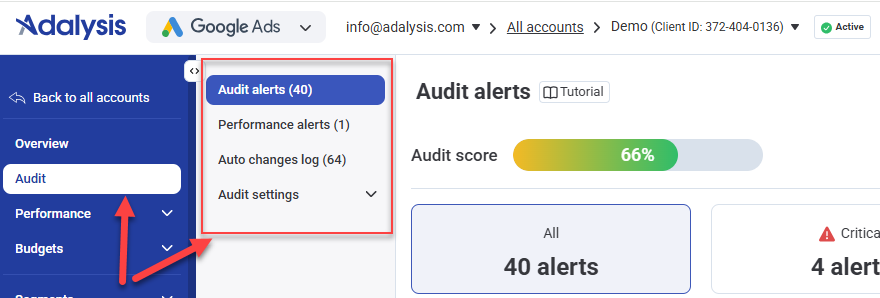
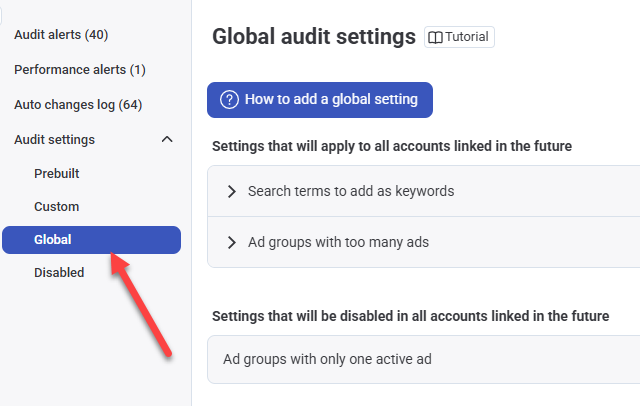
The account-specific **Audit** screen also has a new layout with a new navigation:
* **Audit alerts** shows the results of the 100+ audit checks, as well as any custom alerts you created.
* **Performance alerts** shows the results of the high and standard priority monitors.
* **Auto changes log** shows a record of automatic changes you enabled to execute when specific alerts are triggered.
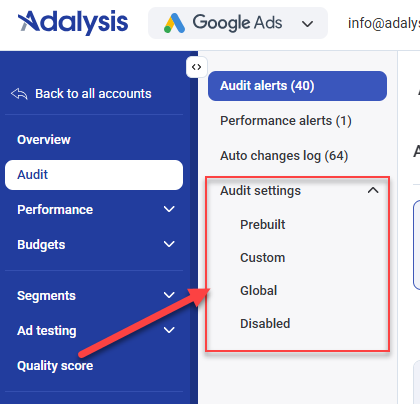
The new **Audit settings** section provides the following features:
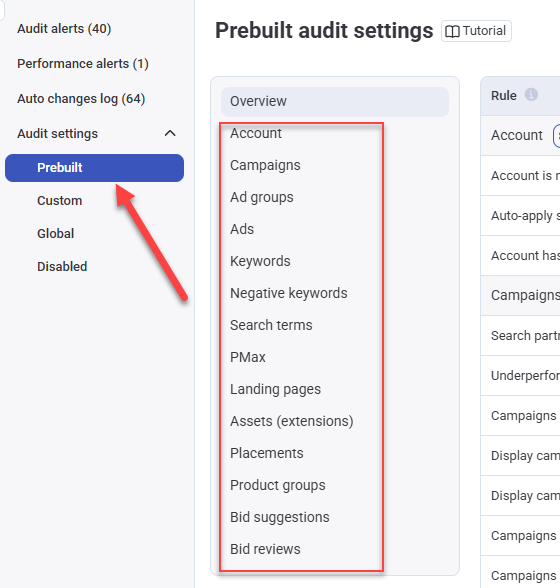
* **Prebuilt**: shows the 100+ audit checks already built into Adalysis (or added by yourself), with the option to customize the settings.
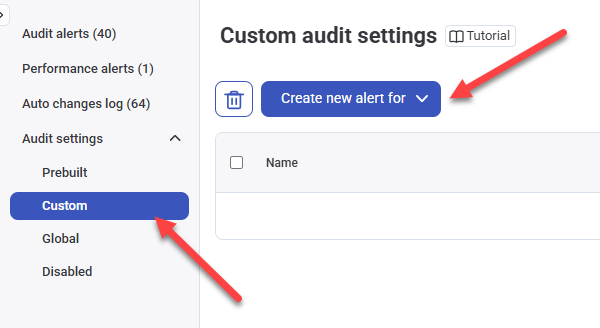
* **Custom**: allows you to define additional custom audits that are not part of the prebuilt ones.
* **Global**: the list of audit settings to enable/disable in accounts linked to Adalysis in the future.
* **Disabled**: the list of audit settings disabled in this account.