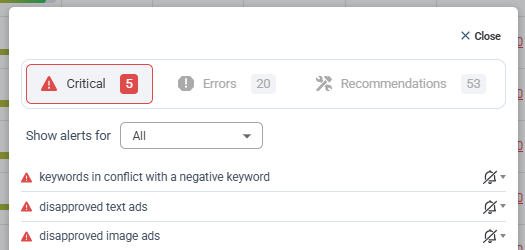
> For the complete documentation index, see [llms.txt](https://docs.adalysis.com/llms.txt). Markdown versions of documentation pages are available by appending `.md` to page URLs; this page is available as [Markdown](https://docs.adalysis.com/tools/audit/resolve-issues-stopping-your-ads-from-running.md).
# Resolve issues stopping your ads from running
Tackle the most urgent issues first
Critical alerts flag issues that stop your ads from running. You can find your alerts on the **Audit & budget** view.
Click the **Critical** column header to sort your accounts by the number of alerts. Or hover over a number for a summary. Then, click any number to go straight to that individual account.
You can also filter your accounts with the **Find accounts by alert type** option.
### How to resolve your alerts
On the **Audit** screen for your individual account, click any alert for custom tools designed to help you review and resolve the error quickly.
Each alert has different options, but there’s always a **Help** link for more context.
### Critical alert notifications
Since critical alerts usually need to be resolved quickly, Adalysis offers daily email/Slack notifications. You can enable/disable them under **Audit**> **Audit settings > Notifications**.
### How to get more from your Adalysis audit
* [Customize your recommendations](https://docs.adalysis.com/onboarding/getting-started/setup-guide#customize-your-prebuilt-alerts)
* [Create your own alerts](https://docs.adalysis.com/onboarding/getting-started/setup-guide#create-your-own-alerts)
* [Auto resolve alerts](https://docs.adalysis.com/onboarding/getting-started/setup-guide#enable-the-auto-resolve-setting)
* [Disable alerts you don’t need](https://docs.adalysis.com/tools/audit/how-to-customize-prebuilt-alerts#disabling-unwanted-alerts)
* [Share customized settings with other accounts](https://docs.adalysis.com/onboarding/getting-started/setup-guide#sharing-the-customized-settings-with-other-accounts)
* [Manage your notifications](https://docs.adalysis.com/onboarding/getting-started/core-account-settings/notifications)