---
description: 'Save time: trade spreadsheets for strategy sessions'
---
# Automate your reporting
{% embed url="https://youtu.be/PwL0g4bicYI" %}
Adalysis reporting tools are designed to save you time and communicate your insights effectively. There are two types: Looker Studio and audit reports. Once set up, both are updated automatically, saving you time on every reporting cycle.
You can find both report types under **Reporting** on your accounts overview menus:
### Looker Studio reports
Google Looker Studio is a free reporting solution that integrates with Adalysis. We provide prebuilt reporting templates, which means you can quickly set up, customize and automate your monthly reporting.
Choose **Client report** or **Team reports** from the **Reporting** menu to choose a prebuilt template you can brand and add to your Looker Studio account.
Once downloaded, the reports are managed within Looker Studio. You'll also need to [set up a Looker Studio account](reporting-setup). The reports are then updated automatically, saving time and repetitive work.
Supported platforms
Google Ads
Google Analytics
Microsoft Advertising
Facebook
{% hint style="info" %}
Free-trial users only have access to a limited number of reporting templates. All reports are accessible as soon as your subscription is activated.
{% endhint %}
### Audit reports
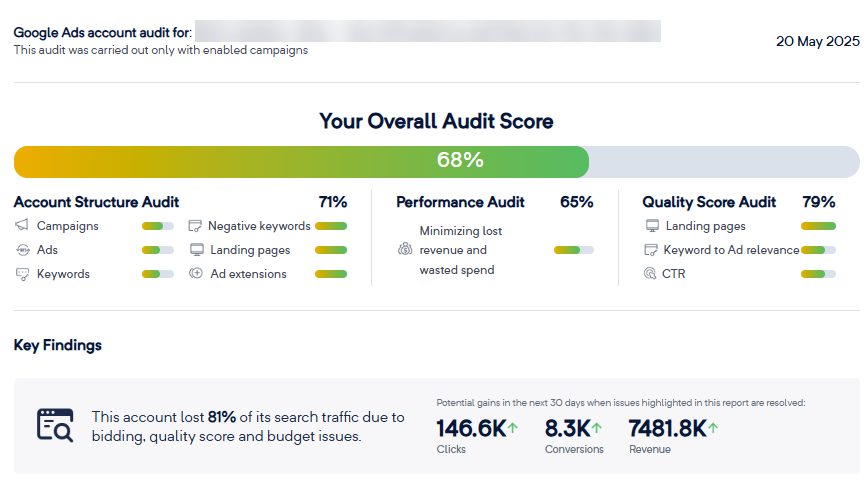
Audit reports summarize Adalysis audit data in a shareable format. They provide a high-level snapshot, and many Adalysis agency customers find them useful for new-business pitches.
Here are the key report sections:
* **Overview**: audit score, key findings, account size, and performance over the last 30 days
* **Performance audit**: lost revenue, wasted spend, potential performance boosts
* **Quality score audit**: account quality score, keyword quality score distribution
* **Account structure best practices audit**
* **Account insights,** incl. ad positions, cost vs conversions, ad testing, segment performance
Find your audit reports in the **Reporting** menu. You can add your own logo.
The reports are also available under **Audit** > **Alerts** for each account**.** Download and share your audit reports as PDFs to support your sales pitches or meetings.